


Your setup has outgrown its power access.
The monitor, the keyboard, the chair — everything exactly where it needs to be. Except your outlet. Behind the desk. On the floor. Three feet from where you actually work.
You've tried to fix it. Velcro ties. An under-desk tray. A better-looking strip. It helped. For about a week.
Nothing fully worked — because none of it fixed the real problem.
Outlets were designed for a lamp and a single desktop. Your setup now runs ten devices. The power source hasn't moved in decades. Every cable on your desk exists to bridge that gap.
Cable management hides the gap. Deskora Pro closes it.
Everything Your Desk Setup Needs
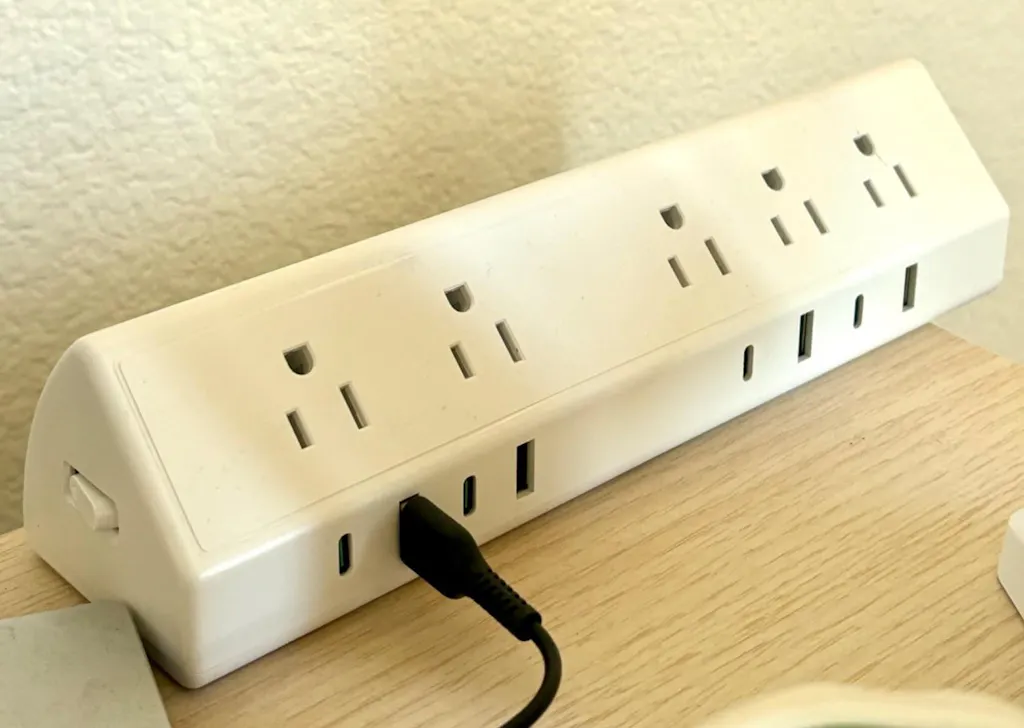
5 AC Outlets
Full desk power for monitors, lamps, chargers, speakers, and everyday accessories.
8 USB Ports
4 USB-C and 4 USB-A ports for phones, tablets, earbuds, controllers, and daily devices.
Desk-Edge Clamp Design
Mounts to the front or side edge of your desk, so power is where you actually work.
Less Cable Clutter
Move power from the floor to the desk edge and reduce the messy cable run underneath.
Wide-Spaced Outlets
Designed to fit larger plugs and adapters without blocking nearby outlets.
Protected, Tool-Free Setup
Clamps on in minutes with no drilling, plus 1,200J surge protection built in.
More space. More power. Less mess.

Power access
Power at arm's reach.
Five AC outlets and eight USB ports at the edge of your desk — not behind the monitor, not on the floor.

Tool-free clamp
On in minutes. Off without a trace.
One knob underneath the desk edge. Tightens firmly. No tools, no drilling, no marks.

Built for modern desks
Built for what your desk is actually running.
Wide-spaced outlets handle larger adapters without blocking neighbours. 1,200J surge protection on everything plugged in.
This is the upgrade.

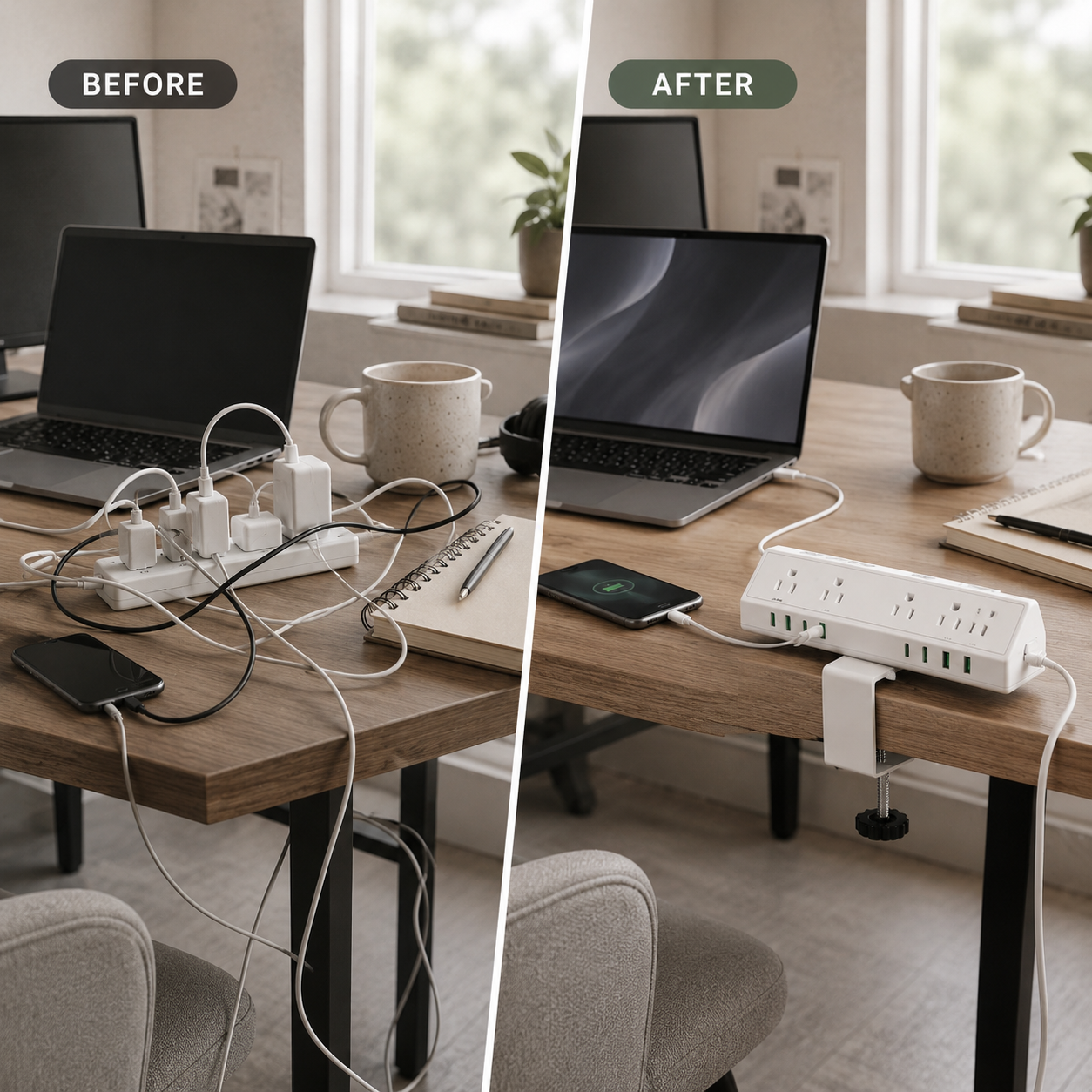
Before
Cables draped. Floor strip on the floor. Outlets three feet from where you work.

After
Deskora Pro at the desk edge. Power within arm's reach. One cable to the wall.
Clamp it on. Power up. No drilling required.
Deskora Pro attaches securely to the edge of your desk, giving you easy-access power without drilling, tools, or permanent changes.
Position it on your desk edge
Place Deskora Pro on the front or side edge of a flat desk surface.
Tighten the clamp underneath
Use the adjustable knob to secure it firmly in place.
Plug in and power up
Connect your devices and keep outlets and USB ports within easy reach.
Fits desk edges up to 1.96 inches thick. Please check your desk edge and underside clearance before ordering.

One upgrade. Not three workarounds.

Most setups are held together by a floor strip, a separate USB charger, and cable management that only hides the problem. Deskora Pro replaces all three — power access, USB charging, and cable reduction — in one desk-mounted unit.
Good questions.
How does it attach to my desk?
An adjustable clamp wraps around the desk edge. Position the unit, tighten one knob underneath — done. No tools. Padded contact points protect the surface. Remove it any time without leaving a mark.
Will it fit my desk?
Fits flat desk edges up to 1.96 inches thick with enough underside clearance for the clamp to tighten. If your edge is curved, bevelled, or unusually shaped, measure before ordering. Our 30-day return policy applies if it doesn't fit.
How long is the power cord?
Deskora Pro includes a 10ft power cord, giving you flexible placement along the front or side edge of your desk. Make sure the cord can safely reach your wall outlet without stretching across walkways.
How many devices can I run at once?
13 ports — 5 AC outlets, 4 USB-C, and 4 USB-A. Most setups won't need more.
What's the real charging speed?
Up to 45W USB-C fast charging on a single compatible port. When multiple USB ports are active, output is shared across them. This is how every multi-port charger works — we say it plainly so there are no surprises.
Does it have surge protection?
Yes. 1,200J built-in surge protection. Every port. No separate accessory needed.
Is it safe near expensive electronics?
Yes — the 1,200J surge protection is designed for this. Standard guidance applies: don't exceed rated load, don't stack power strips, ensure ventilation. Contact us with specific setup questions before ordering.
What about standing desks?
Because the clamp attaches to the desk itself, it rises and lowers with your desk. Power stays at the edge regardless of desk position.
Will it scratch my desk?
The clamp contact points are padded. Installed correctly on a compatible flat-edge desk, it won't mark the surface. Don't overtighten.
Customer Reviews
Deskora Pro has just launched.
Be one of the first customers to share your experience and help others decide if Deskora Pro is right for their setup.
Verified reviews collected after purchase
30-day returns if it is not the right fit
Free tracked US shipping
Your setup is almost there.
$30 off + free US shipping.
Clamps on in minutes.
Power where you actually work.
Free shipping · 30-day return policy · 1,200J surge protection